
S’ouvre dans un nouvel onglet

GFT1604

  • Up to 50 MHz independent trigger rate (repetitive or single) for every channel

    The model GFT1604 offer two inputs or three internal synchronized Timers (adjustable from 0.01 Hz to 50 MHz) or software command for triggering all selected delay channel.

  • Controlled via USB and Ethernet

    GFT1604 parameters can be remote controlled via USB to UART or Ethernet.

  • Ultra-compact packaging and low power

Request a quote

Applications

  • System Laser Timing Control
  • ATE Application
  • Laser Pulse Piking
  • Precision Pulse Application
  • Instrument Triggering
  • Components Test
GFT1604

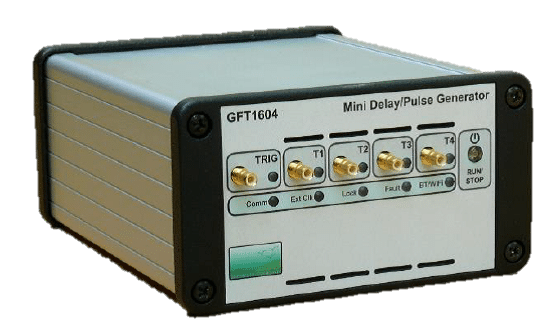
The GFT1604 Mini Pulse & Delay Generator provides 4 (or 8 in option) independent delayed pulses. Delays up to 10 seconds can be programmed with 100 ps resolution and channel to channel jitter less than 50 ps RMS. An option allows to enhance delay resolution to 1 ps, and channel to channel jitter to 5 ps RMS.

SMB outputs deliver 1.5 V to 5 V, 1 ns rise time pulses, into 50 Ω. Pulse amplitude, polarity and width are adjustable on each output channel. In option, pulse amplitude can be 3 V to 10 V or 15 V to 50 V, into 50 Ω.

The model GFT1604 offer two inputs or three internal synchronized Timers (adjustable from 0.1 Hz to 50 MHz) or software command for triggering all selected delay channel. Either trigger rate may be set as one-shot or repetitive.

The generator uses an internal 100MHz TCXO clock reference, or an external user programmable (from 10 MHz to 240 MHz) clock (sine or square).

GFT1604 parameters can be remote controlled via USB to UART or Ethernet.

This generator is well suited to synchronise all the devices of Picosecond Laser System. In this application the “clock input” of the delay generator receives a reference signal (80 MHz for example) from a laser oscillator via an O/E (optical to electrical converter) and the delay generator provides single or repetitive pulses (adjusted in delay, amplitude, polarity and width) synchronized on “clock input” with very low jitter. From delay generator 4 GPIO under software control allow command to low frequency device of the Laser System for security or control.

External Trigger Mode

  • Input “TRIG” Rate single or repetitive up to 40 MHz, with prescaler, adjustable threshold from +100 mV to +5 V (step 1 mV), adjustable positive or negative slope and 5 ns min pulse width
  • Trigger delay Lower than 85 ns (insertion delay) (lower than 105 ns with option 10)

Internal Trigger Mode

  • Rate repetitive From three Timers with frequency = 0.01 Hz to 50 MHz (in step of 5 ns)
  • Rate single Synchronized on internals timers or soft command

Channel Output pulse T1 to T4 (and T5 to T8)

  • Amplitude
    1.5 V to 5 V in step of 1 mV into 50 Ω
    3.0 V to 10 V in step of 2 mV into high impedance (>1 kΩ)
  • Rise/Fall Time 1 ns / 1 ns into 50 Ω or 2 ns / 2 ns into high impedance @ full scale
  • Width10 ns to 10 s in step of 5 ns
  • Pulse Polarity Positive or Negative
  • Burst Mode Burst count = 1 to 1 000 000 000, adjustable period in step of 5 ns
  • MUX Mode Any channel may be ORed’ to all outputs (per group of 4)

External Clock reference

  • Threshold0 V, internal 50 Ω
  • LevelMin -10 dBm, typical 6 dBm
  • Frequency 10 MHz to 240 MHz, user programmable in steps of 0.25 MHz up to 120 MHz then user programmable in steps of 0.50 MHz

Clock output

  • Level>500 mV p-p, into 50 Ω, AC coupling
  • Frequency100 MHz if internal clocked or same as external if external clocked (800 MHz with option 2)

Gate or second trigger or daisy chaining

  • Function Gate or second External Trigger with adjustable threshold or daisy chaining to second GFT1604
  • InputActive high or low in gate mode, positive/negative slope with rate <40 MHz in trigger mode

GPIO: Input or output lines

  • 4 x GPIOInput or output, 0 or 3 V level, impedance > 20 kΩ input & 100 Ω output

General

  • Interface Control USB to UART, Ethernet 10/100 Mb/s
  • User’s sets 8 sets to save or recall eight specific configurations
  • Software toolsFree Drivers for Windows 11 and Linux, USB application with GUI is furnished
  • Power consumption 2.5 W to 15 W according to configuration
  • Power supply USB or External AC (80 - 264 V/47 - 63 Hz) to DC (5 V, 4 A), adapter furnished
  • Size and Weight 108 x 58.6 x 129 mm, < 1kg

Options

  • Option 1 :
    Extension to 8 channels
  • Option 2 :
    1 ps delay resolution (only available with GFT1604-4C model), with channel-to-channel jitter <10 ps (at short delay) and min width of 50 ns
    Narrow pulse mode: it allows min width of 3 ns in step of 1 ps on 2 channel outputs
  • Option 3 :
    (Bank of 2 channels) 3 V to 10V channel output, width = 10 ns to 10 ms, rise/fall time = 1/1 ns into 50 Ω
  • Option 4 :
    (Bank of 2 channels) 15 V to 50 V channel output, width = 50 ns to 5 µs, rise/fall time = 3/15 ns into 50 Ω
  • Option 5 :
    (Bank of 1 channel) with a max of 2 differential LVDS or HSTL outputs, 175 mV to 1200 mV, width = 10 ns to 10 s, rise/fall time <0.5/0.5 ns under 100 Ω differential, and 10 ps channel to channel jitter or 4 ps channel to channel jitter with “option 2”
    Narrow pulse mode: it allows min width of 1 ns in step of 100 ps with base version, or 500 ps min width in step of 1 ps with option 2 (1 ps delay resolution)
  • Option 6 :
    (Bank of 1 channel) with a max of 2 differential LVDS or HSTL clock outputs, independently programmable up to 800 MHz, phase adjustable in steps of 71 ps
  • Option 7 :
    SMB termination plug (50 Ω)
  • Option 8 :
    Case with mounting flanges
  • Option 9 :
    5" SMB to BNC cable
  • Option 10 :
    Jitter improvement (Lower than 100 ps rms) between external trigger and outputs, min width reduced to 1 ns

Ordering information

  • Model GFT1604-4C4 channel mini pulse & delay generator (base version)
  • Model GFT1604-8C8 channel mini pulse & delay generator (with option 1)
  • Download data sheet

    Lorem ipsum dolor sit amet, consectetur adipiscing viverra ornare, eros dolor nulla.
    Download file
  • Lorem ipsum

    Lorem ipsum dolor sit amet, consectetur adipiscing viverra ornare, eros dolor nulla.
    Learn more