
S’ouvre dans un nouvel onglet

GFT2605

  • 4 GPIO signals for communication to external equipment

    The instrument uses an internal 10 MHz oscillator or an external very stable 10 MHz to 240 MHz source.

  • 4 GPIO signals for communication to external equipment

    The Instrument offers 4 GPIO (4 digital bi-directional signals) under software control for communication to external equipment.

  • Ultra-Compact package with optional mounting flanges

Request a quote

Applications

  • Time of flight mass spectrometry
  • Lab / R&D Characterizations
  • Fluorescent decay
  • Real time, time stamping
  • ATE (Automatic Test Equipment)
  • Optical and magnetic disk timing
  • Component Test
  • Variation in Pulse Timing

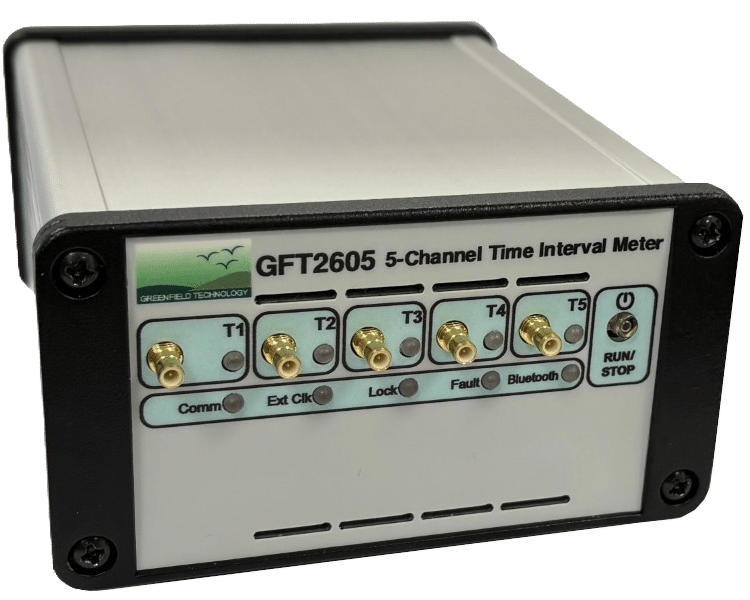
The GFT2605 is a very precise Time Interval Meter. It has five channels: Channel 1 is used as the “Start” time reference for channels 2-5 being “Stops” events of the Time Interval measurement. Each channel can measure the time of the rising/falling edge of one electrical input, to 20 picoseconds resolution with > 100 second’s range. Time Interval samples can be automatically processed to provide Mean, Max, Min and RMS/Jitter.

The instrument uses an internal 10 MHz oscillator or an external very stable 10 MHz to 240 MHz source.

The Instrument offers 4 GPIO (4 digital bi-directional signals) under software control for communication to external equipment.

The GFT2605 is an ultra-compact and low power instrument with Ethernet interface.

The instrument has a built in Web server that provides an easy remote control via a standard Web Browser. “Control panel Web page” from embedded web server provide an easy method to:

  • Configure settings for each channel and Control operation and status of the instrument
  • View the measurements (value and graphic form)
  • Save the measurements in your computer file

Key features

  • Channel number5

TIM channel

  • Number1 Start, 4 Stops or 5-channel time interval counter / time stamper
  • Time resolution20 picoseconds single shot, 1 ps averaged
  • Time range>100 seconds
  • Time Jitter50 ps RMS typ. for short time intervals

Channel Input (T1 to T5)

  • Edge triggerRising or falling
  • Input impedance / coupling50 Ω / DC
  • ThresholdProgrammable from -5 to +5 V, in step of 10 mV
  • Max safe input±3.3 V DC, +/-6.5 V with pulses up to 10 ms width

Gate Input

  • LevelProgrammable from 0.1 to +5 V, in step of 10 mV, active high or low
  • Input impedance / coupling50 Ω / DC

Clock Reference

  • Internal100 MHz, ±1 ppm stability, available as AC square output with level > 500 mV p-p into 50 Ω
  • ExternalAC coupling, sine or square, 0 V threshold, internal 50 Ω, level min -10 dBm, typical 6 dBm, 10 MHz to 240 MHz, user programmable in steps of 0.25 MHz up to 120 MHz then user programmable in steps of 0.50 MHz

Measurement

  • Measurement trigger modeSingle or Repetitive
  • Sample per measurement1 to 1024 or fixed at 1026
  • Sample rateUp to 10 MHz
  • Measurement type
    Mean, Max, Min, RMS/jitter of samples
    Graphic form of samples Mean, Max, Min, RMS/jitter
    File of sample and mean measurement

GPIO: Input or output lines

  • Number of GPIO signals4 (digital bi-directional signal)
  • Signal level input2.0 V High min, 0.8 V Low max
  • Signal level Output2.4 V High min, 0.6 V Low max at 24 mA

General

  • Control interface10/100 MB/s Ethernet; USB
  • SoftwareSet of Ethernet commands, Web page for Edge, Chrome, Firefox
  • Power supplyUSB or External AC (80 - 264 V/47–63 Hz) to DC (5 V, 4 A)
  • IndicatorsPower, Trigger, Busy
  • ConnectorsChannel T1 to T5, Gate, Clock are SMB connectors Ethernet: RJ45, USB: micro-AB
  • Size / Weight108 x 56.6 x 129 mm / under 1kg

Option

  • Option 1: MF
    Case with mounting flanges
  • Option 2: C
    5" SMB to BNC cable
  • Option 3: CG
    8" SUBD to GPIO cable

Ordering Information

  • GFT2605Base version: 5 channel Time Interval Meter
  • GFT2605-MF-C5Adds mounting flanges and 5x 5’’ SMB to BNC cable
  • Download data sheet

    Lorem ipsum dolor sit amet, consectetur adipiscing viverra ornare, eros dolor nulla.
    Download file
  • Lorem ipsum

    Lorem ipsum dolor sit amet, consectetur adipiscing viverra ornare, eros dolor nulla.
    Learn more